>> Home / projects / ai, local-ai, hermes, llm, qwen, openai, gpu
My AI Agent Setup: Local Models, Cloud APIs, and a Lot of Tinkering
∵ Abdullah Al-Hatem ∴ 2026-08-01 ∞ 8'
My AI Agent Setup: Local Models, Cloud APIs, and a Lot of Tinkering
TL;DR
I wanted to run a useful AI assistant locally on my RTX 5070 Ti, mostly for privacy and because it is fun to make things work on your own hardware. I got Qwen3.6-35B-A3B running at more than 50 tokens per second, which was honestly better than I expected. But after comparing it with cloud models, I stopped trying to make local AI do absolutely everything. My current setup is a hybrid one: Hermes runs the agent and tools, OpenAI Codex handles most of the reasoning, Groq handles voice transcription, and local Qwen is still there for offline work, privacy, and experimenting.
What I was trying to build
I wanted something more useful than a chatbot. The idea was to have a personal agent that I could talk to through Telegram, give access to files and tools, and let run background jobs when needed.
That is where Hermes Agent comes in. It is the part that connects the model to everything else: terminal commands, files, browser tools, MCP servers, memory, scheduled tasks, and messaging platforms.
The model is replaceable. Hermes is the thing that turns it into an assistant.
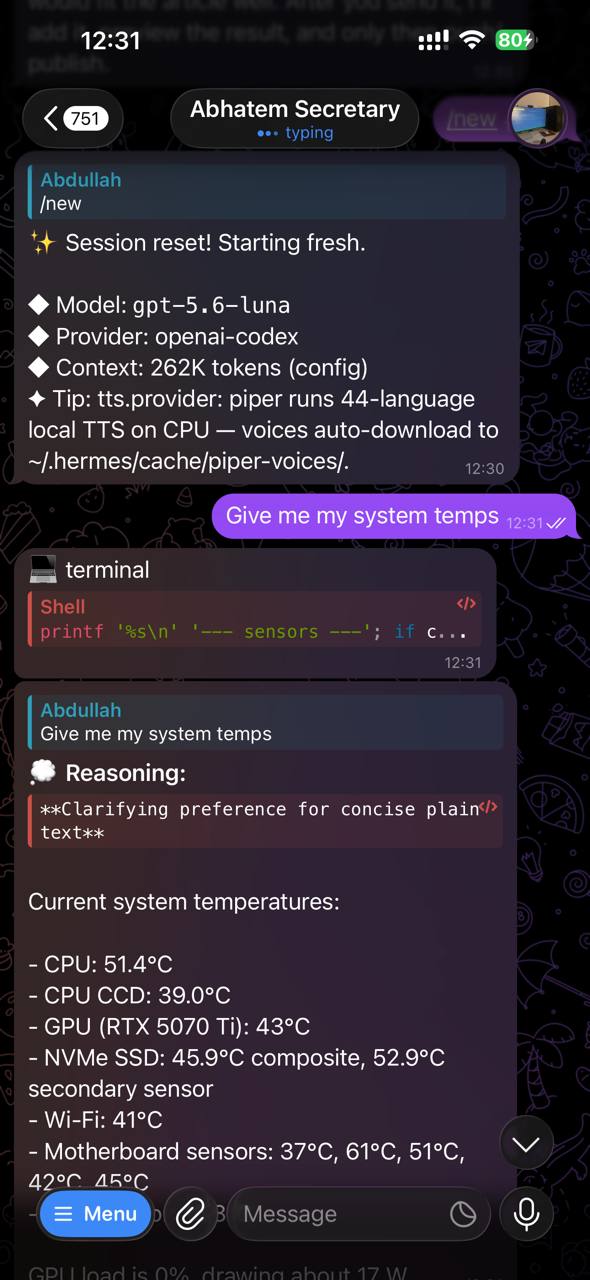
The screenshot above is what this looks like from my phone: I can send a request in Telegram, Hermes can run a terminal command on my desktop, and the result comes back in the same conversation.
My main machine has an RTX 5070 Ti with 16 GB of VRAM and 32 GB of RAM. That is enough for interesting local models, but not enough to load every model entirely into VRAM. So naturally I ended up spending a lot of time thinking about MoE models and offloading expert weights to the CPU.
The local model adventure
I tried quite a few models and backends: Qwen, Gemma, Ollama, LM Studio, vLLM, llama.cpp, and an ik_llama.cpp fork.
The Gemma experiment ended quickly. I tried Gemma 4 26B-A4B through LM Studio, hoping that its MoE design would make it a good fit for my GPU. Instead, it crashed with a SIGABRT before becoming healthy. After some investigation, it looked like a known problem with that particular QAT GGUF variant and LM Studio. I gave up on it rather than spending another week hunting for the magic combination of sliders.
I also tried Qwen3.5 9B with Ollama. It was not the most exciting setup, but it worked, and there is something to be said for a model that simply starts when you ask it to.
The best local result came from Qwen3.6-35B-A3B in LM Studio. I connected it to Hermes through LM Studio’s OpenAI-compatible endpoint and got more than 50 tokens per second, with one run reaching about 58 tokens per second.
That was a really nice result for a 35B-class model on a 16 GB card. It was not always the smartest model in the room, but it was fast enough to feel useful. I expected it to be much worse than it actually was.
The offloading rabbit hole
At one point the speed dropped to around 46 tokens per second, even though I remembered getting more than 50 before. The cause was a bad combination of settings: the GPU offload and the “force experts to CPU” settings were fighting each other.
This is one of those things that is obvious after you find it and completely annoying before you do. With MoE models, you cannot tune those settings independently and assume everything will be fine.
I also played with CPU threads, context length, and KV-cache quantization. Sometimes the result was faster. Sometimes I just created a new problem.
I briefly looked at Krasis after seeing a very impressive prefill benchmark online. The prefill number was interesting, but the decode speed was much less exciting, at roughly 14.9 tokens per second. It also seemed to want around 40 GB of system RAM, while I only have 32 GB. I passed on it.
That was a useful reminder not to judge an interactive model by one impressive benchmark number. Prefill speed and the speed you actually see while chatting are different things.
When cloud models started looking better
While I was trying to make the local setup work, I also tested cloud models through OpenRouter. At different points I used models such as Nemotron and DeepSeek for planning and more difficult tasks.
DeepSeek V4 Flash was the one that really got my attention. At the time of writing, OpenRouter lists it at about $0.09 per million input tokens and $0.18 per million output tokens, with a context window of roughly one million tokens. That is ridiculously cheap for something that is fast enough and capable enough to be useful for coding and agent-style work.
The catch is that it is text-only. It is not a complete replacement for my current setup, especially when I want vision or voice. But I am keeping it in mind as a fallback. If my Codex subscription changes, becomes less useful with Hermes, or the terms get worse, DeepSeek V4 Flash would be one of the first alternatives I would try.
For now, though, my current setup is good enough and I am happy with it.
The uncomfortable conclusion was that some cloud models were faster, smarter, and cheap enough that local inference did not automatically make financial sense.
I originally assumed that running the model myself would be cheaper. But once you include the price of hardware, electricity, heat, noise, and all the time spent tuning things, the calculation becomes less obvious.
Local models still have advantages that are difficult to price. They can work offline. Personal data can stay on the machine. There is no per-token bill. And, honestly, getting a large model running on a GPU that should not quite be able to run it is satisfying in a way that an API response is not.
Where I ended up
My current Hermes setup uses OpenAI Codex as the main provider through my subscription. I also configured the vision and delegated-agent paths to use OpenAI wherever Hermes supports it.
The local Qwen setup has not disappeared. I still keep it around for private or offline work, experiments, and the occasional urge to see how fast I can make it run again.
Voice transcription is the one obvious exception. I use Groq Whisper for that because the Codex subscription does not provide access to OpenAI’s Whisper API. Using OpenAI transcription would require a separate API key and separate API billing. It would be nice if subscriptions and APIs worked more consistently, but they do not.
So the current arrangement is fairly simple:
- Hermes handles the agent, tools, memory, and Telegram interface.
- OpenAI Codex handles most of the reasoning.
- Groq handles voice transcription.
- Local Qwen handles offline work and experiments.
That is not as ideologically pure as “everything local”, but it is much more practical.
The other stuff
The language model is only part of the setup. I have also connected Hermes to MCP servers, browser tools, email, Google Workspace, background jobs, and house-hunting workflows.
Those integrations came with their own problems. I ran into file-locking errors, CORS issues on local HTTP services, and the usual authentication problems. At some point I also experimented with Grafana and Loki for monitoring and thought about whether Hermes should run on my desktop or on a Hetzner VPS.
This is when the whole thing starts feeling less like a chatbot and more like a small application that happens to talk back.
That is probably the part I enjoy most. The model is interesting, but connecting it to real tools is where it starts becoming useful.
The conclusion for now
The local setup worked better than I expected. Qwen3.6-35B-A3B running above 50 tokens per second on a 16 GB GPU is genuinely impressive, at least to me.
But I no longer think the goal should be to run everything locally just because it is possible. Cloud models are often the better choice for difficult reasoning, and my current setup reflects that.
I ended up with a hybrid system because neither side wins at everything. OpenAI gives me the strongest general experience in this setup. Local Qwen gives me control and privacy. Groq makes voice messages convenient. Hermes connects all of it together.
I still want to try new models and backends, of course. That part probably will not stop. But I am less interested now in finding one perfect model and more interested in making the whole system useful without constantly babysitting it.
Also, I am still not buying a €1,000 hardware upgrade just to discover that the next model needs 24 GB of VRAM.
Latest Blog Posts
-
-

-
 A quick trip through i3 and back May 2024
 -
 why I'm still using emacs in 2024 Apr 2024
 - see all →